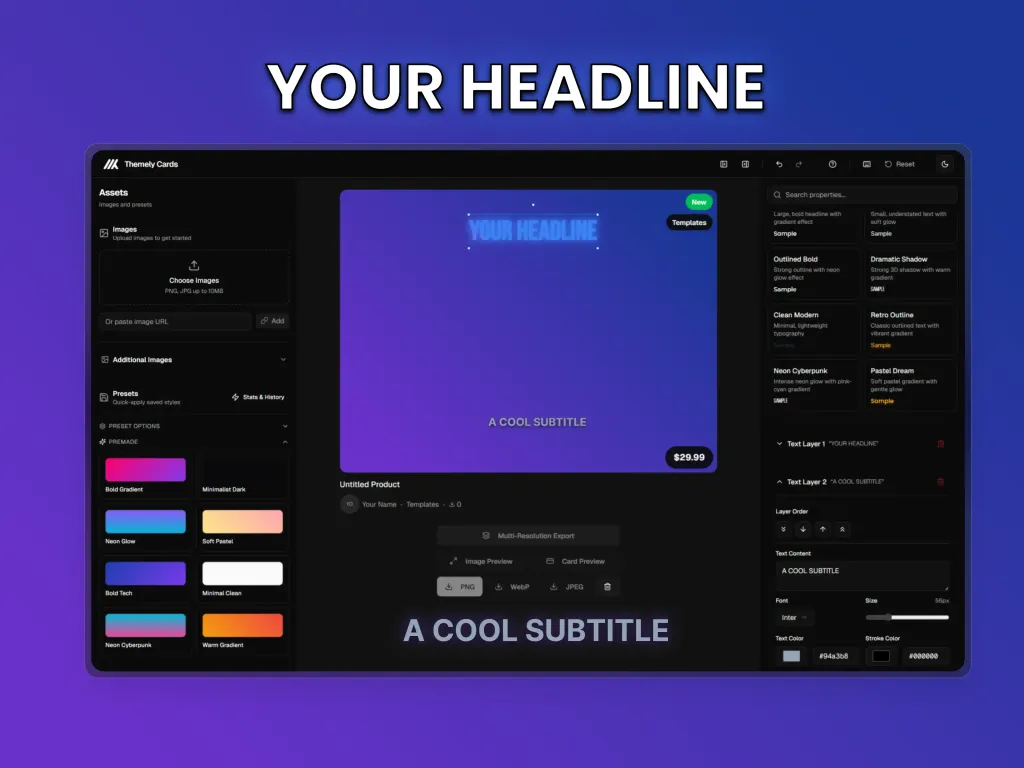
Introducing Themely Cards
So you've got a theme or plugin you want to list on Themely. Awesome. But now comes the part nobody really talks about - you need a thumbnail that doesn't look like it was made in MS Paint circa 2003.
We've all been there. You open Photoshop (or Figma, or Canva, or whatever), stare at a blank canvas, and wonder why making a simple product image feels like it requires a design degree. It shouldn't be this hard.
That's why we built Themely Cards.
What Even Is This?
Themely Cards is a browser-based tool that lets you create professional-looking product thumbnails in a few minutes. No downloads, no subscriptions, no "please sign up for our newsletter" popups. Just open it up and start making stuff.
Upload your screenshot, tweak some settings, export. Done.
The Stuff You Can Actually Do
Let's get into what this thing does instead of speaking in vague marketing terms.
Drop In Your Images
Drag and drop your screenshots or paste a URL. The tool handles multiple images if you want to batch export a bunch of thumbnails at once. Each image gets its own zoom and position controls, so you can frame things exactly how you want.
Make It Look Good (Without Trying Too Hard)
Here's where it gets useful:
Frame styles - Round those corners, add some depth with shadows, throw a border on there. The usual stuff, but with sliders instead of memorizing Photoshop shortcuts.
Backgrounds - Solid colors, gradients, patterns, or upload your own image. The gradient editor actually makes sense, which is more than I can say for some tools.
Filters - Brightness, contrast, saturation. Nothing fancy, but enough to make your screenshot pop without looking over-processed.
Text That Doesn't Suck
Add text overlays with actual font options. Pick from fonts like Inter, Montserrat, Bebas Neue - the ones designers actually use. You get stroke, shadows, and proper alignment controls. Drag text around on the canvas or punch in exact positions if you're particular about that sort of thing.
Badge Preview
Want to see how your thumbnail will actually look on themely.dev? The tool lets you preview badges that appear on the marketplace:
Featured status
"New" label
Open source indicator
Category tags
Pricing (with a toggle for FREE)
These are just for preview - they won't be baked into your exported image. It's handy for checking that your design still looks good when the site overlays its own badges on top.
Presets (Because Nobody Wants to Start From Scratch)
Made something you like? Save it as a preset. Next time you need a thumbnail, load up your preset and just swap the image. We've included some premade presets too if you want a starting point.
Everything saves to your browser automatically, so you can close the tab and come back later without losing your work.
Export Options
When you're done messing around, export as PNG or WebP at full resolution (1920x1920 for the standard product card size). There's also presets for YouTube thumbnails, Instagram posts, and Twitter headers if you need those.
The export is what you see - no weird compression surprises or "upgrade to premium for HD" nonsense.
Keyboard Shortcuts
For the power users who hate clicking:
Ctrl+S- ExportCtrl+Z- UndoCtrl+Shift+Z- RedoSpacebar- Toggle previewDelete- Remove selected element
Nothing revolutionary, but it speeds things up once you get the hang of it.
Who's This For?
Honestly? Anyone listing on Themely who doesn't want to spend an hour making a thumbnail. Theme developers, plugin authors, template creators - if you've got a product and need an image for it, this tool exists to make that less annoying.
Is it going to replace Photoshop for complex design work? No. But for product thumbnails? It does the job without the overhead.
Try It Out
The tool is free and runs entirely in your browser. Your images never leave your computer (everything's processed locally), so you don't have to worry about uploading proprietary screenshots to some random server.
Give it a shot and let us know what you think. We're still adding features based on what people actually need, so feedback is genuinely useful.
What's Coming Next
We're working on a few things:
More premade presets
Additional export sizes
Template sharing (so you can share presets with your team)
Better batch export options
No timeline promises because, well, you know how that goes. But it's on the list.